

Setting Up Security Keys
Learn how to set up Two-Factor Authentication (2FA) and Security Keys in your Deribit account through the web interface.
Overview
When you call an API method that requires security key authorization, the server will respond with a special response indicating that additional authorization is needed. Instead of executing the operation immediately, the server returns a response withsecurity_key_authorization_required set to true, along with a challenge that must be included in your retry request.
Process Flow
The security key authorization process follows these steps:1
Initial Request
Send your API request as normal. The server will detect if security key authorization is required.
2
Authorization Required Response
The server responds with
security_key_authorization_required: true and provides a challenge that must be used in the retry request.3
Generate TOTP Code
Generate a TOTP code from your 2FA secret using a TOTP library. The code is valid for 30 seconds.
4
Retry Request
Resend the original request with authorization_data (the TOTP code) and the challenge from step 2. The challenge expires after 1 minute.
5
Success or Error
The server either processes your request or returns an error if the code is invalid. If an error occurs, you must start over from step 1.
Step-by-Step Example
Step 1: Initial Request
Send your API request as you normally would:Step 2: Authorization Required Response
The server responds with a non-error response indicating that security key authorization is required:security_key_authorization_required- Set totruewhen additional authorization is neededsecurity_keys- A list of available security key types. Each object contains:type- The type of security key:"tfa"for TOTP Two-Factor Authenticationname- The name of the security key
rp_id- Relying party identifier (used with WebAuthn for hardware keys)challenge- A unique challenge string that must be included in your retry request. Valid for 1 minute only.
Step 3: Generate TOTP Code
Generate a TOTP code from your 2FA secret. See the TOTP Code Generation section below for code examples in various programming languages.Step 4: Retry Request with Authorization
Resend your original request, adding theauthorization_data (your TOTP code) and the challenge from the previous response:
- The
challengemust be the exact value received in step 2 - The
authorization_datamust be the current TOTP code (typically 6 digits) - The challenge expires after 1 minute - if it expires, you must start over from step 1
TOTP Code Generation
To generate TOTP codes programmatically, you need:- Your 2FA secret (the base32-encoded secret key you received when setting up 2FA)
- A TOTP library for your programming language
Security: Before implementing TOTP code generation in production, please review the Security Best Practices for TOTP Implementation section to ensure proper handling of your 2FA secret and secure implementation.
- Python
- JavaScript/Node.js
- C++
pip install pyotpSecurity Best Practices for TOTP Implementation
Getting Your 2FA Secret
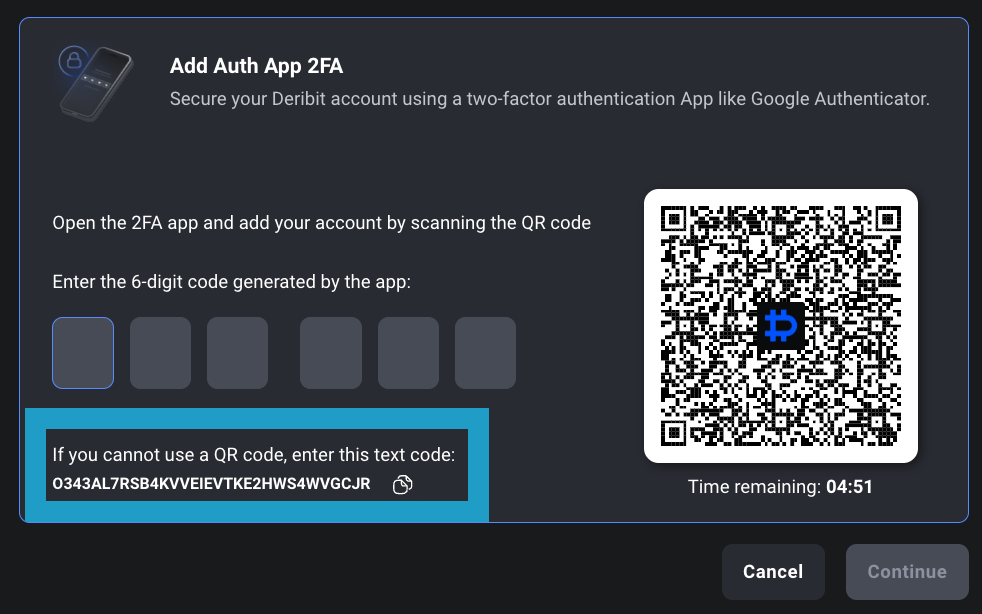
When you set up 2FA in your Deribit account, you receive a secret key (displayed as a QR code and as a text string). This secret is what you use to generate TOTP codes. Important Security Notes:- The secret is base32-encoded
- Store your 2FA secret securely (e.g., in environment variables or a secure key management system)
- Never commit your 2FA secret to version control
Secure Secret Storage
Secure Secret Storage
- Never hardcode your 2FA secret in source code
- Use environment variables or secure configuration files with restricted permissions
- Consider dedicated key management systems (AWS Secrets Manager, HashiCorp Vault, Azure Key Vault, etc.)
- Encrypt secrets at rest if stored in databases or files
- Use file system permissions to restrict access (e.g.,
chmod 600on Unix systems)
Access Control
Access Control
- Limit access to the 2FA secret to only the processes that need it
- Use principle of least privilege - only grant access to necessary services/users
- Implement audit logging for access to secrets
- Rotate secrets periodically if your key management system supports it
Secure Transmission
Secure Transmission
- Never log or print TOTP codes or secrets in production
- Use HTTPS/TLS for all API communications
- Avoid transmitting secrets over unencrypted channels
- Sanitize error messages to prevent secret leakage
Clock Synchronization
Clock Synchronization
- Ensure accurate system time using NTP (Network Time Protocol)
- TOTP is time-sensitive - clock drift can cause authentication failures
- Monitor and alert on significant time discrepancies
- Consider implementing time window tolerance in your code (some libraries support this)
Error Handling and Rate Limiting
Error Handling and Rate Limiting
- Implement rate limiting on TOTP validation attempts to prevent brute force attacks
- Don’t expose detailed error messages that could help attackers
- Log failed authentication attempts for security monitoring
- Implement account lockout after multiple failed attempts
Code Generation Security
Code Generation Security
- Use cryptographically secure random number generators for nonces
- Generate TOTP codes on-demand rather than pre-generating and storing them
- Clear sensitive data from memory when no longer needed (where possible)
- Use secure libraries that are actively maintained and audited
Backup and Recovery
Backup and Recovery
- Store encrypted backups of your 2FA secret in a secure location
- Document your recovery process in case of secret loss
- Consider multiple authorized personnel for secret management (with proper access controls)
- Test your recovery process regularly
Monitoring and Alerting
Monitoring and Alerting
- Monitor for unusual authentication patterns
- Set up alerts for multiple failed TOTP attempts
- Track and log all security key authorization requests
- Review access logs regularly for suspicious activity
Development vs Production
Development vs Production
- Use separate 2FA secrets for development, staging, and production environments
- Never use production secrets in development or testing
- Implement environment-specific configuration management
- Use secrets management tools that support environment separation
Compliance and Auditing
Compliance and Auditing
- Maintain audit trails of secret access and TOTP usage
- Follow your organization’s security policies and compliance requirements
- Regularly review and update your security practices
- Conduct security audits of your TOTP implementation
Error Handling
When there is an error related to Security Key authorization, the server returns an error response with code13668 and message security_key_authorization_error. The error includes a data.reason field indicating the specific issue:
- Error Codes
- Error Recovery
- Common Issues
Possible Error Reasons:
tfa_code_not_matched- The provided TFA code was invalid or incorrectused_tfa_code- The provided TFA code was already used (TOTP codes can only be used once)challenge_timeout- The challenge has expired (valid for 1 minute only)tfa_code_is_required- The TFA code was empty or not provided