

- Quantity Limit – Maximum total traded volume (in base currency) allowed before MMP triggers.
- Delta Limit – Maximum directional exposure.
- Vega Limit – (Options only) Maximum change in vega exposure allowed before triggering.
- Time Interval – Time window (in seconds) over which limits are measured.
- Frozen Time – Duration (in seconds) for which quoting remains disabled after an MMP trigger.
- Maximum Quote Quantity (MQQ) – Maximum combined open MMP order size, configured per index but enforced per side, per instrument (order book).
MMP groups exist but apply only to Mass Quotes Specifications. For standard order-based quoting, MMP configuration is defined per index.
frozen_time.
For comprehensive details on MMP configuration and management, refer to the Deribit API Documentation.
MMP Settings can also be configured inside the Account settings page.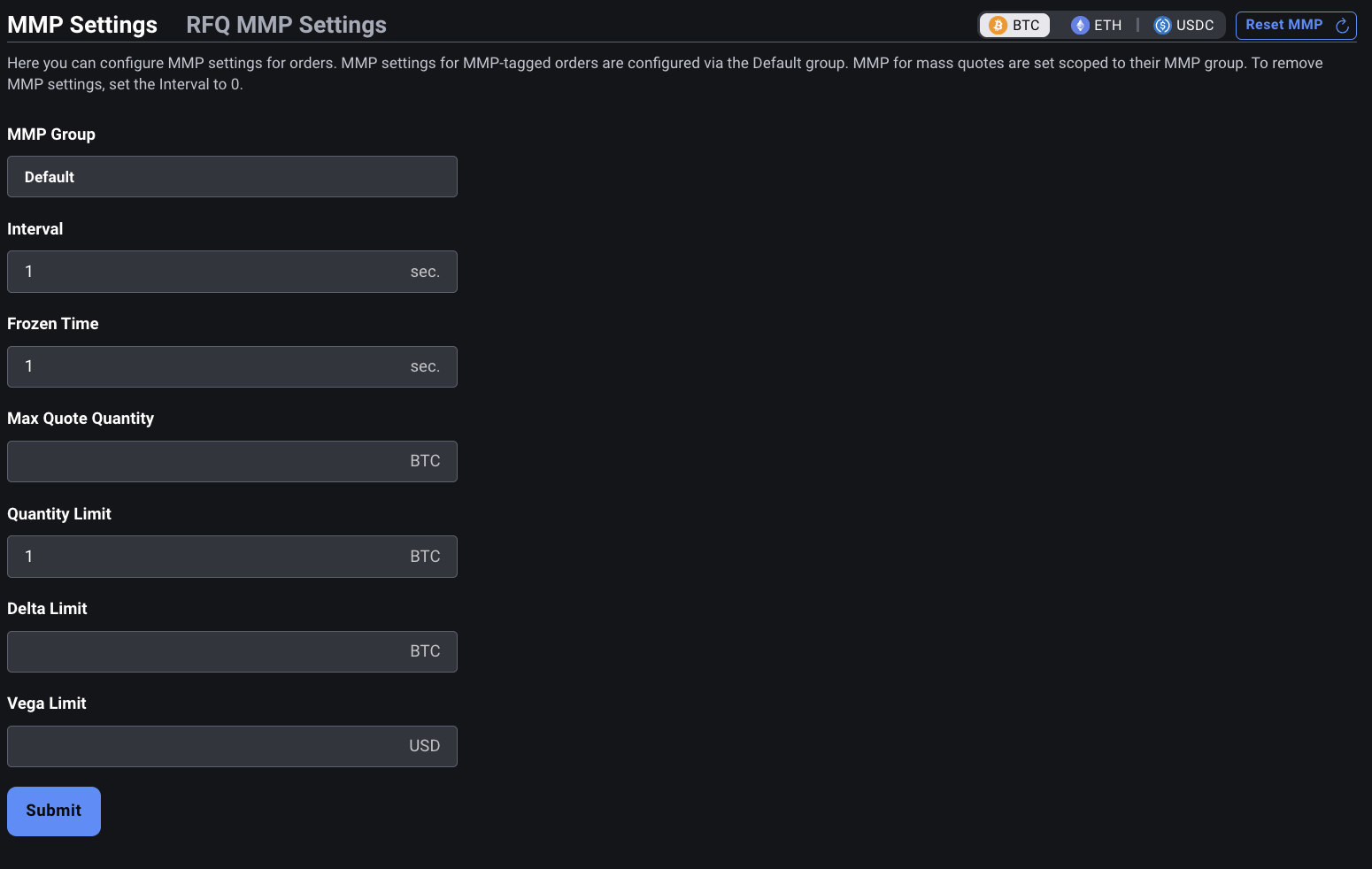
Understanding Interval vs Frozen Time
These two required parameters serve different roles within the MMP system:interval
Theinterval defines how long Deribit tracks trading activity after the first trade occurs:
- It starts after the first trade.
- If no new trades happen after the interval ends, a new interval begins with the next trade.
- If trades occur during the interval, it continues uninterrupted.
- All activity inside a single interval is counted toward MMP limits.
- If set to 0, MMP is removed and any reserved margin is released.
frozen_time – Freeze Duration
Thefrozen_time defines how long MMP remains triggered and blocking new MMP orders after a limit is breached:
- During the frozen period, quoting for that index is disabled.
- After the frozen period ends, MMP resets automatically.
- Setting
frozen_time = 0disables automatic reset. In this case:- A manual reset is required using
private/reset_mmp.
- A manual reset is required using
Understanding Maximum Quote Quantity (MQQ)
Maximum Quote Quantity (MQQ) defines the cumulative limit on the total size of open MMP quotes or orders. It acts as an exposure cap, preventing excessive quoting volume even before trades occur. MQQ is configured per index (viaindex_name in set_mmp_config) but enforced per side, per instrument (order book). This means a single MQQ value is set for an entire index (e.g., eth_usd), but the limit is applied independently to each instrument on that index. Options, futures, and perpetuals each have their own separate enforcement.
For example, with ETH instruments, MQQ is configured once for the eth_usd index but is enforced independently for each of the following:
ETH-1APR26-1975-CETH-1APR26-2175-CETH-26JUN26ETH-PERPETUAL
Key Concepts
Configured per Index, Enforced per Instrument (Order Book): MQQ is not aggregated across instruments or expiries. Each instrument (order book) has its own separate MQQ enforcement, even though the configuration is shared at the index level. Cumulative Size Limit, Not Order Count: MQQ limits the total combined size of open MMP orders per side, not the number of orders. Example: with MQQ = 3 BTC, you can place three 1 BTC orders, or one 2.5 BTC and one 0.5 BTC order, as long as the total per side per instrument ≤ 3 BTC. Independent per MMP Group: Each MMP group (used only for mass quotes) has its own MQQ configuration. Limits are applied separately for each group. Relation to Quantity Limit: MQQ can be set greater thanquantity_limit.
This allows larger open quotes while still letting MMP trigger on partial fills, and decouples MMP’s reserved margin from the quantity limit.
Base Currency Enforcement:
MQQ is specified and enforced in the base currency of the instrument.
Size Calculations:
- Inverse futures:
size = amount / price - Inverse spreads:
size = amount / indexPrice- (Switching to minimum mark price of legs in December 2025.)
- Quotes or MMP orders exceeding
max_quote_quantityare rejected. - Regular orders above MQQ may still enter the market, but new quotes that would exceed the limit are not accepted.
- Starting December 2025, if one side of a two-sided quote is rejected, the other side will also be rejected.
- From 18.11.2025 Release:
margin reserved = max(MQQ, quantity_limit) - From December 2025 Release:
margin reserved = MQQ × 0.03
Reserved margin is held as long as MMP is configured. To release it, set
interval to 0 via private/set_mmp_config. This removes the MMP configuration and frees all held margin. You can verify your current MMP margin requirement in the Portfolio Margin section of the Deribit platform.Understanding other parameters
index_name
Identifier of the derivative instrument (index) on the Deribit platform, such asbtc_usd or eth_usd. All configuration settings will apply specifically to this index.
quantity_limit
The total traded quantity, measured in units of the base currency (e.g., BTC in BTC-PERPETUAL), within the interval. This count is direction-agnostic. A buy followed by a sell counts double. Example: Buy 10 BTC and sell 10 BTC = 20 total quantity. Applicable to both options and futures.Once this is set, an initial margin will be reserved even without any open positions. Initial margin is now reserved based on
max_quote_quantity: margin reserved = max_quote_quantity * 0.03delta_limit
The maximum allowable net transaction delta change during the interval. Expressed in units of base currency. The delta limit is treated as an absolute threshold: e.g.,delta_limit: 10 → MMP is triggered if net transaction delta exceeds +10 or drops below -10.
Direction matters: buying +5 delta and selling −5 delta cancels out if within the same interval.
Note that we use the net transaction delta instead of delta.Net Transaction Delta = Delta - Mark Price.In the rest of this document, “delta” actually refers to net transaction delta.
vega_limit
The maximum change in vega exposure allowed within a given interval, measured in absolute terms. Expressed in USD, representing the change in sensitivity to implied volatility across executed trades. This parameter is primarily relevant for options traders managing risk in volatile markets. Similar todelta_limit, the vega_limit is direction-aware and evaluated on a net basis. If the exposure exceeds the set threshold (positively or negatively), MMP will be triggered.
mmp_group
Specifies the MMP group used for Mass Quotes. If left empty (omitted), the methods apply to the orders MMP group, the MMP configuration that governs regular MMP-tagged orders.Leaving
mmp_group empty is explicitly allowed and is the correct way to configure the orders MMP group. It is not an error or an incomplete request. Omitting the field intentionally targets the default orders MMP group rather than any named mass quote group.block_rfq
When set totrue, the methods apply to Block RFQ MMP settings. See Deribit Block RFQ API walkthrough for more details.
Setting up MMP
To configure Market Maker Protection (MMP) for a specific index, you must define the interval duration, freeze duration, and at least one exposure limit. MMP configuration is applied using theprivate/set_mmp_config method.
Required parameters
index_name The index for which MMP is being configured (e.g.,btc_usd, eth_usd).
interval
Duration (in seconds) used to track trading activity.
frozen_time
Duration (in seconds) that MMP remains active/frozen once triggered.
At least one limit parameter
You must set at least one of the following:
quantity_limitdelta_limitvega_limitmax_quote_quantity(MQQ)
Example
Block RFQ MMPMMP can also be configured for Block RFQ quoting. The configuration process for Block RFQ MMP is described in the Deribit Block RFQ API walkthrough article.
Resetting MMP
If your MMP protection has been triggered and quoting is frozen for a given index, you can resume quoting either automatically after the configured freeze time or manually via the API usingprivate/reset_mmp.
Behavior
- If the configured
frozen_timehas expired, the system will automatically reset MMP and quoting resumes for that index. - If
frozen_timeis set to 0 (automatic reset disabled), you must callprivate/reset_mmpto re-enable quoting. - You can also perform a manual reset during the frozen period if you want to resume quoting early.
- After reset, the previous MMP configuration remains unchanged (the limits, interval, etc. stay in effect).
Placing orders with MMP flag
Clients can control whether individual limit orders are subject to Market Maker Protection by setting themmp flag in buy, sell, or edit requests.
To enable or disable MMP for a specific order, include "mmp": true or "mmp": false in the request.
If you’re only updating price or size and wish to retain the current MMP setting, you can simply omit the mmp parameter. Its state will remain unchanged.
The edit method supports toggling the MMP flag, allowing you to apply or remove protection without cancelling and resubmitting the order.
Monitoring MMP
You can monitor both the current configuration and the live MMP state for any index using two API methods.1. Checking the Current MMP Configuration
Callingprivate/get_mmp_config returns all currently active MMP parameters for the selected index, including the interval, frozen_time, quantity/delta/vega limits, and max_quote_quantity. This is useful for verifying your configuration or confirming applied updates.
2. Checking the Current MMP Status
Callingprivate/get_mmp_status returns the live MMP state for the index, including:
- Whether MMP is enabled or triggered
- Remaining frozen time (if triggered)
- Whether quoting is currently allowed
- Any active freeze conditions
MMP Events and Notifications
Deribit provides real-time feedback on MMP (Market Maker Protection) activity viauser.mmp_trigger.{index_name} subscription and event flags, enabling clients to react promptly when protection is triggered.
Clients can subscribe to the channel:
{index_name} with the desired instrument index, such as:
user.mmp_trigger.btc
frozen_until: 0, it means MMP will remain active until manually reset using the private/reset_mmp method.
This notification allows the client to track MMP state per index and avoid submitting new orders that would be rejected due to ongoing MMP freeze.
MMP Flags in WebSocket Responses
In addition to the event channel, Deribit also communicates MMP-trigger-related actions using a special field in order event messages. If an order is cancelled as a direct result of an MMP trigger, the order event will include:Best Practices
- Monitor both
user.mmp_triggerevents andmmp_cancelledflags to maintain a complete picture of your quoting activity and protection status. - On receiving a
frozen_untiltimestamp, you should pause quote submission for the affected index until the freeze period ends or you manually reset MMP. - Always handle the
mmp_cancelledflag explicitly in order management logic to prevent resubmitting orders that may immediately be cancelled again.